Workflow Recorder
An editorial desktop app for capturing the moves you make, syncing them through a bridge, and replaying them on demand — built so recording a workflow feels calm instead of cluttered.
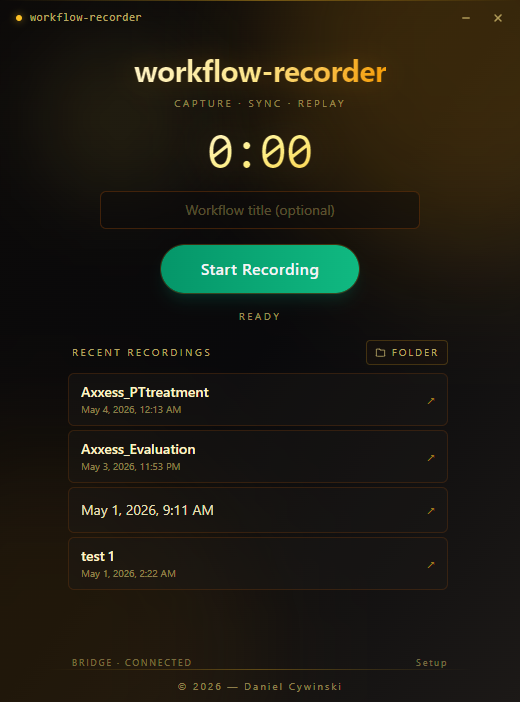
The home view: gold serif wordmark, large timer, optional title field, primary Start Recording action, and a recent-recordings list with bridge connection status.
Recording a workflow should feel calmer than running a meeting.
Most recording tools make users think too hard before they can start: choose a source, confirm audio, check camera settings, watch a timer, and hope the right thing is being captured. The setup tax often costs more than the recording itself.
Workflow Recorder removes that load. The timer, the title, and the Start Recording action stay in plain sight — so capturing a workflow feels like opening a notebook, not booting up a studio.
An editorial home screen with three calm actions: Capture, Sync, Replay.
The app opens to a serif wordmark, a large timer, and an optional title field. A single Start Recording button drives the primary flow, with bridge connection status quietly noted so users always know the sync is alive.
Recent recordings live just below in a clean list, so picking a previous session is one tap. For clients, this is the kind of utility that pays for itself in saved support calls, faster onboarding, and reusable documentation.
Repeating the same manual process every week? Let's make it a tool.
You work directly with me from first idea to shipped product.